Thor’s Lightning TotalControl™ Digital Air Manifold | Automatic Tire Inflation & Deflation
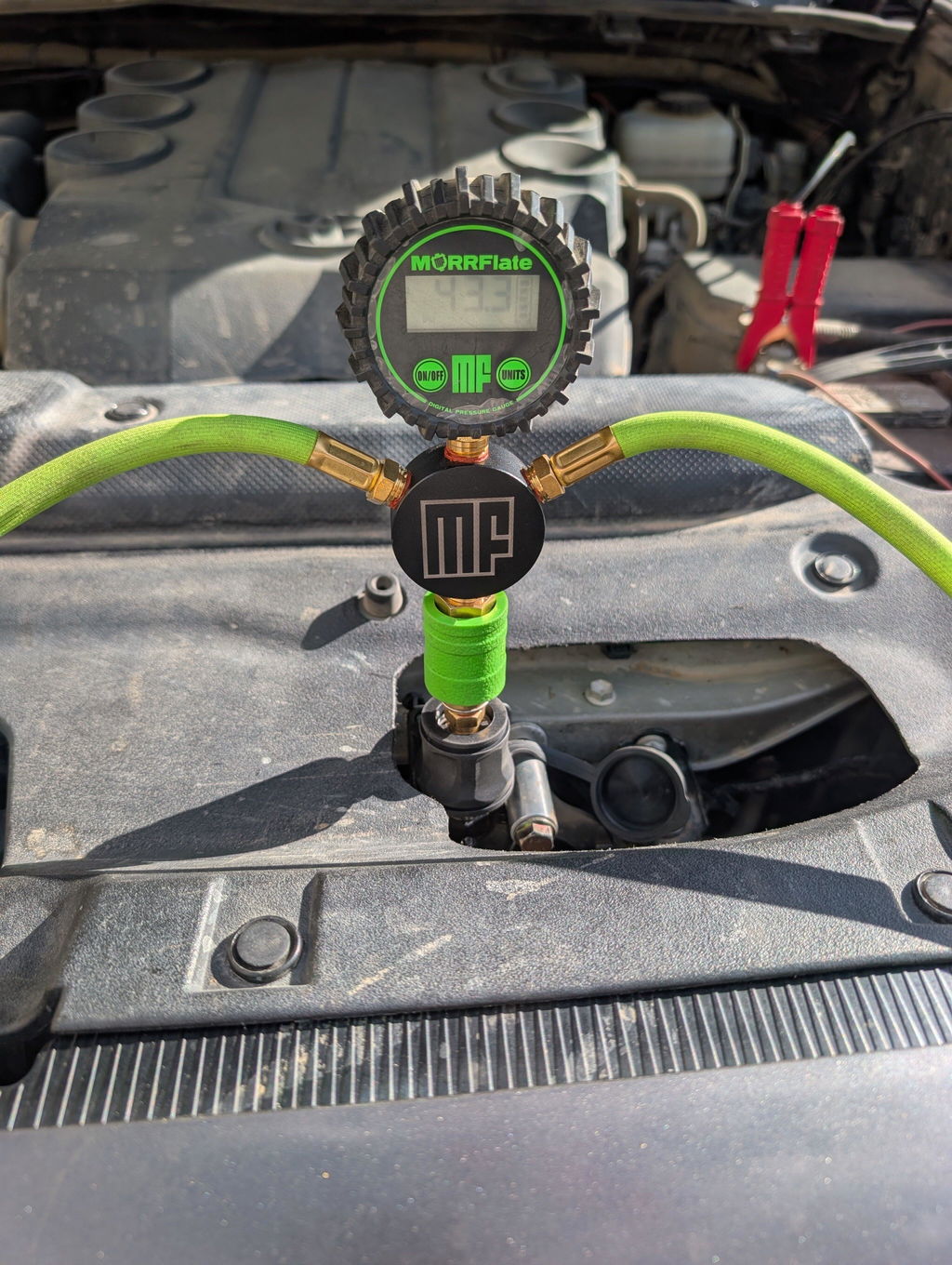
 The Thor's Lightning TotalControl Digital Air Manifold is a first in the air management industry. Easily deflate and inflate your vehicle tires to a pre-set pressure and let the TotalControl Digital Air Manifold do the rest of the job- it will automatically shut off the air flow when the target pressure is reached. Compatible with the Thor's Lightning Rapid Multi-Tire Portable Adventure Air System hose kits and any air compressor equipped with a pressure switch- we've got your air needs covered!
Thor’s Lightning TotalControl™ Digital Air Manifold
A rechargeable digital air manifold that adds preset-pressure inflation and deflation control to compatible multi-tire air systems. Set a target PSI and TotalControl™ automatically closes airflow when the selected pressure is reached.
- Compatible compressors: air compressors equipped with a pressure switch for automatic inflation control
- Functions: preset inflation, preset deflation, pressure monitoring, and pressure equalization across connected tires
- Connections: two heavy-duty female I/M industrial quick-disconnect fittings
- Power: onboard 15.4V rechargeable lithium battery with USB-C charging
- Dimensions: 9.5 x 8 x 2.5 in.
- Weight: 1.65 lb
- Best for: 2-tire and 4-tire hose systems, off-road airing down, reinflation, trailers, RVs, and fleet tire-pressure management
Includes a 1-year warranty on the lithium battery and 3-year warranty against manufacturing defects.
What is the Thor's Lightning TotalControl Digital Air Manifold?
The Thor's Lightning TotalControl Air Manifold allows for ANY air compressor equipped with a pressure switch to be outfitted with our TotalControl technology- which means you can set a target pressure for both inflation and deflation and the TotalControl technology will shut off the air.
No more babysitting your air source while your tires are deflated to trail pressure or inflated to trail pressure. What can you be doing instead? Getting your rig ready for the trail or the street, chatting with friends and family, or chowing down on food and drink- it's really up to you!
How does the TotalControl Digital Air Manifold work?
It's really simple- connect any number of tires you want via the two quick-disconnect fittings on either side of the TotalControl Air Manifold. Then, turn the unit on using the power switch and select the target pressure using the up and down arrows. From there, you can either open the air valve for deflation, or turn on your air compressor for inflation. The TotalControl Air Manifold will close the valve when the target pressure is reached!
The other thing that sets the TotalControl Air Manifold apart is it's power source- an onboard 15.4V lithium battery. No button batteries or disposable batteries to worry about, just power the unit on and you are ready to Be an Air Hero! The TotalControl Air Manifold is equipped with a USB-C charging port for easy charging and use of the unit during low battery operation.
What air compressors is the TotalControl Digital Air Manifold compatible with?
We couldn't possibly list them all because there are so many. ANY compressor equipped with a pressure switch can be paired with the TotalControl Air Manifold for inflation. The TotalControl Air Manifold will shut off the air flow when the target tire pressure is reached, which will trigger the pressure switch on the air compressor to shut the air compressor off.
Is my Thor's Lightning Hose Kit compatible with the TotalControl Digital Air Manifold?
Of course! Just attach your Thor's Lightning AirFlex hoses to the TotalControl Air Manifold using the quick disconnect fittings, and you are all set for inflation and deflation of multiple tires at once.
TotalControl Digital Air Manifold Specifications:
- Compatible with any air compressor equipped with a pressure switch (inflation)
- Deflate/Inflate multiple tires at one time
- Equalizes tire pressure of all tires connected to manifold
- Easy to use heavy duty rubber buttons for setting target pressure
- Onboard 15.4V lithium battery with USB-C charging port
- Heavy duty female I/M (industrial milton) quick disconnect air fittings for protection against leaks and easy air hose connection
- 1 year warranty on lithium battery
- 3 year warranty against manufacturing defects
- Patent-pending design
- Dimensions: 9.5"x8"x2.5"
- Weight: 1.65 lbs.
We value your satisfaction with Thor's Lightning Air Systems and its products. If you aren't satisfied with your product, we want to make it right.
Our refund and returns policy lasts 90 days. If 90 days have passed since your purchase, we can’t offer you a full refund or exchange.
To be eligible for a return, your item must be returned with all components that were included in the order.
To complete your return, we require a receipt or proof of purchase.
Once your return is received and inspected, we will send you an email to notify you that we have received your returned item. We will also notify you of the approval or rejection of your refund.
If you are approved, then your refund will be processed, and a credit will automatically be applied to your credit card or original method of payment, within a certain amount of days.
Late or missing refunds
If you haven’t received a refund yet, first check your bank account again.
Then contact your credit card company, it may take some time before your refund is officially posted.
Next contact your bank. There is often some processing time before a refund is posted.
If you’ve done all of this and you still have not received your refund yet, please contact us at returns@thorslightning.com.
Sale items
Only regular priced items may be refunded. Sale items cannot be refunded.
Shipping returns
To return your product, you should mail your product to: 419 Adams Ave #1, Albert Lea, MN 56007
You will be responsible for paying for your own shipping costs for returning your item. Shipping costs are non-refundable. If you receive a refund, the cost of return shipping will be deducted from your refund.
Depending on where you live, the time it may take for your exchanged product to reach you may vary.
If you are returning more expensive items, you may consider using a trackable shipping service or purchasing shipping insurance. We don’t guarantee that we will receive your returned item.
Need help?
Contact us at returns@thorslightning.com for questions related to refunds and returns.
Duration: 3 years from the date of purchase by the original Purchaser.
Limited Warranty:
- Who gives this warranty (Warrantor): Thor’s Lightning, LLC, 419 Adams Ave #1, Albert Lea, MN 56007. Who receives this warranty (Purchaser): The original Purchaser (other than for purpose of resale)
- What products are covered by this warranty: Thor’s Lightning Air System tire pressure inflation/deflation/equalization device and/or Thor’s Lightning Compressor Mounting Bracket and/or Thor's Lightning Air Compressors.
- What is covered under this warranty: manufacturer defects due to material and/or workmanship with the exceptions noted below.
- What is not covered under this warranty:
- The cost of labor to make repairs or replacements
- Any failure that results from Purchaser’s abuse, neglect or failure to operate, maintain or service product in accordance with instructions provided in the owner’s manual(s) supplied
- Any damage caused by using equipment beyond rated capacity and/or capability
- Items or service normally required to maintain the product.
- Items considered general wear parts such as hoses, etc. unless wear or failure is a direct result of manufacturer defect due to material and/or workmanship
- Any component damaged in shipment or any failure caused by installing or operating equipment under conditions not in accordance with installation and operation guidelines or damaged by contact with tools or surroundings
- Any component failure caused by rain, excessive humidity, corrosive environments or other contaminants
- Worn components due to improper maintenance or corrosive environments
- Cosmetic defects that do not interfere with product functionality
- Damage due to incorrect voltage or improper wiring
- Any incidental, indirect, or consequential loss, damage, or expense that may result from any defect, failure, or malfunction of a Thor’s Lightning product
- Responsibilities of Warrantor under this warranty: Repair or replace with either new or reconditioned unit at Warrantor’s option, component and/or unit which is defective, has malfunctioned and/or failed to conform within duration of the warranty period.
- Responsibilities of Purchaser under this warranty:
- Provide dated proof of purchase and maintenance records
- Freight costs must be borne by the Purchaser.
- Use reasonable care in the operation and maintenance of the products as described in the owner’s manual(s).
- When Warrantor will perform repair or replacement under this warranty: Repair or replacement will be scheduled and serviced according to the normal work flow at the servicing location, and depending on the availability of replacement parts.
Limitation of Liability: Thor’s Lightning shall have no obligation pursuant to this Warranty with respect to products which in our sole judgment have been altered damaged, misused, abused, badly worn, lost or improperly maintained. This Warranty is null and void if the customer or any other person other than an authorized representative of Thor’s Lightning has made any attempt to service or modify the tool prior to its return to Thor’s Lightning under this Warranty. In no event will either party be liable for any damage caused by the other party's failure to fulfill its responsibilities under these terms and conditions. In no event will either party be liable for any lost profits, lost savings, incidental damage, or other economic consequential damages Thor’s Lightning products are provided and sold as is without any express or implied warranties including warranties of merchantability or fitness for particular purpose. No warranties, expressed or implied, will apply after this period. Thor’s Lightning may modify these terms and conditions at any time by either providing the customer with written notice or posting such revised terms on Thor’s Lightning website. Such revised terms shall be effective thirty days from the date of such written notice or posting.
Setup & Support
Find quick-start instructions, installation videos, troubleshooting help, and product support for your Thor’s Lightning air system.
What do you need help with?
Choose your product below. Each section includes a video, simplified steps, and key setup notes.
Lightning Strike Compressor
Operation, TotalControl mode, manual mode, and error codes.
View Compressor InstructionsStandard Hammer Manifold
Manual inflation and deflation using the manifold valve. No preset PSI or auto shutoff.
View Standard Manifold InstructionsTotalControl Hammer Manifold
Preset PSI inflation and deflation using the electronic TotalControl manifold.
View TotalControl InstructionsMounts & Bed Rack
JKU compressor mount and Refuge Modular Bed Rack install videos.
View Install VideosLightning Strike Compressor
View / Download ManualQuick Start
- Connect the air hose to the compressor using the quick-connect fitting.
- Connect the Thor’s Lightning Dynamo chuck to the valve stem.
- Connect the power clamps to the vehicle battery and start the engine.
- Set desired pressure using the + or - buttons, then wait for the display to stop blinking.
- Press the power button to begin inflation. The compressor will stop automatically at the preset pressure.
Operating Modes
TotalControl™ Mode
Manual Mode
Normal Pausing
Error Codes
Allow the compressor to cool before restarting.
Check hose, fittings, and valve connection.
Input current is greater than 120A. Check power connections and load.
The selected preset pressure is below the tire’s current pressure. Increase the preset pressure before starting inflation. Applies only to STRIKE001.
Pressure is greater than 155 PSI. Reduce pressure and restart.
Sensor may be loose or damaged. Contact support.
Sensor may be loose or damaged. Contact support.
Input voltage is greater than 16V. Check vehicle electrical system.
Input voltage is lower than 12V. Start engine or check battery.
Installation & Product Videos
Watch the correct video for your product before installation or use.
Jeep Wrangler JKU Compressor Mount
Mount InstallBefore You Start
- Confirm you have the correct mount for your Jeep Wrangler JKU.
- Lay out all hardware before beginning installation.
- Watch the full video once before tightening final hardware.
- After installation, verify the compressor and mount are secure.
Refuge Modular Bed Rack
Bed Rack InstallInstall Notes
- Identify all rack components and hardware before assembly.
- Loosely install hardware first, then square the rack.
- Tighten hardware evenly once everything is aligned.
- Recheck hardware after your first drive.
Standard Hammer Manifold
Manual ManifoldStandard Hammer Manifold
Important: The Standard Hammer Manifold is fully manual. It does not have preset PSI, automatic shutoff, or electronic inflation/deflation control.
To Inflate
- Unpack hoses and orient the manifold so it is accessible for your air source.
- Connect the hose sections to the manifold using the quick-connect couplers.
- Make sure the valve is closed before connecting to the tires.
- Connect the tire chucks to the valve stems and make sure there are no kinks in the hoses.
- Connect the manifold to your air source.
- Open the manifold valve before turning on your air source.
- Turn on your air source and inflate the tires.
- Turn off the air source to check pressure with your gauge.
- Repeat as needed until desired tire pressure is reached.
- Leave the system connected for 10-15 seconds with the valve closed to help equalize pressure across all connected tires.
To Deflate
- Unpack hoses and orient the manifold so it is accessible.
- Connect the hose sections to the manifold using the quick-connect couplers.
- Make sure the valve is closed before connecting to the tires.
- Connect the tire chucks to the valve stems and make sure there are no kinks in the hoses.
- Open the manifold valve to begin deflation.
- Close the valve to check pressure with your gauge.
- Repeat as needed until desired tire pressure is reached.
- Leave the system connected for 10-15 seconds with the valve closed to help equalize pressure across all connected tires.
TotalControl Hammer Manifold
Preset PSI ManifoldTotalControl Hammer Manifold
Important: The TotalControl Hammer Manifold is the electronic manifold with preset PSI inflation/deflation. This is separate from the Standard Hammer Manifold shown in the video above.
To Inflate
- Unpack hoses and orient the manifold so it is accessible for your air source.
- Connect the controller to an air source, such as an air compressor or air tank.
- Connect the controller to the tires using the air hoses.
- Press the power button to turn the controller on.
- Set the desired PSI using the + or - buttons.
- Open the manual valve and turn on the air source to begin inflation.
- The process may pause 2-4 times for pressure calibration.
- When desired pressure is reached, the controller will close the internal electronic valve and beep.
- Turn off the air source.
- Disconnect hoses from the tires, then disconnect the air source and turn off the controller.
To Deflate
- Connect the controller to the tires using the air hoses without connecting an air source.
- Press the power button to turn the controller on.
- Set the desired PSI using the + or - buttons.
- Open the manual valve to begin deflation.
- The controller may pause a few times for pressure calibration.
- When desired pressure is reached, the controller will close the internal electronic valve and beep.
- Close the manual valve and disconnect the hoses from the tires.
Rapid Multi-Tire 4-Tire System
Inflation / DeflationRapid System Basics
To Deflate
- Unpack and orient hoses so the manifold is accessible.
- Connect hose sections to the manifold couplers.
- Connect tire chucks to valve stems and avoid hose kinks.
- Open the valve to deflate, then close to check pressure.
- Leave connected for 10-15 seconds with valve closed to equalize pressure.
To Inflate
- Unpack and orient hoses so the manifold is accessible.
- Connect hose sections to the manifold couplers.
- Connect tire chucks to valve stems and avoid hose kinks.
- Connect manifold coupler to the air source.
- Open the valve before turning on the air source.
- Inflate, then turn off air source to check pressure as needed.
- Leave connected for 10-15 seconds with valve closed to equalize pressure.
Need Help?
If you have a problem, contact Thor’s Lightning directly before returning your product to the retailer. We’ll help you get it solved faster.
RELATED PRODUCTS